Wednesday, 29 February 2012

Queens Project - Week 7

Another week goes by; the end of this project gets closer. Basically onto and finishing textures. I’ve understood light maps a lot more recently. I followed a tutorial on how to make them and they are pretty simple to make to be honest, I thought it would be a lot harder since I’m still learning UDK.

Most of my modelling and textures are done, they are easy to make however the walkway at this time has been handed over to another group member, which I’ve been having trouble with, so I’ll be doing more assets to make up for this.

ChipBoard.


We’ve basically got a basement and the walkway is now going to be in a cage to bolster things up a bit. There are more assets to be made as now February ends and finishing up is required. Testing and bug fixing will be done as well as adding a few extra rooms, secrets probably and just those little assets that will fill up the remaining parts of the level.

Board.


There really isn’t much to say about last week, there’ll be more to talk about when the deadline is over with shortly and things start to come together more shortly, so I’ll post a much bigger entry about things come the end of this week.

Year 2 - Week 17 - February 20th - 24th

To start off I want to talk about life drawing and about making use of the space on the paper drawing on. Well I know that when drawing say a self portrait you use a the paper or whatever you have in a portrait position, however I believe that if the drawing is small enough to fit onto a landscape format then it really doesn’t matter.  I’ve told I should make use of the portrait space, but I think it doesn’t matter if you’re not going to fit the whole page. I mean when I draw pretty much anything I don’t tend to go for a large scale, I go for the smaller scale the way I see what I’m drawing.

 My Life Drawing. 320 x 180 Resolution.


However a technique I picked up on was that when I’m drawing and measuring things out, if you want to reach a bigger scale but make sure everything looks accurate still then all I do is measure up the contours in and around the image or in this case the outline of the body then it’s simple enough just to double everything up. For example you see a cube that is equal to 1cm vertically and 1cm horizontally orthographically, I’ll obviously draw it that way on paper. All you have to do is double each side up to 2cm each and you basically have that same image in an equal resolution.


Same Drawing doubled... 640 x 360.


I use this because I find that I tend to mess up a lot when drawing on a larger scale. However you can find that if you try this on the same canvas, for example an A3 piece of paper then it will be better to draw on an A2 sheet for doubling up. Even so tripling up and so on works the exact same.

Another Orange.

More fruit again; I’m definitely producing work faster now. I say it every time but it is working. I want say a few things about the 9th floor project. Originally I went for the seminar room and this is what I got:


Basically I designed it with seating, speakers in the corners of the room, a desk with seating and a monitor at the front of the room, a projector on the ceiling pointing at the screen, windows and blinds/Art on the walls and finally lights on the walls. It’s a very simple but I think ‘sleek’ design that would work quite nicely I think. Looking back at my research you don’t want to waste too much money on one room so I think it would work well possibly. The seating looks very basic but it would be leather padded possibly or just a cushion like material. I wanted to go for something that is quite spacey, have a lot of free room so everything is not cramped and you can see the screen cause you could even use this room for presentations and open days etc not just lectures I think it sells the course quite well if you put student work up on the walls it allows you to move around and view the work. The seating would quite spacey, in blocks of rows with a nice widescreen projection.

Wednesday, 22 February 2012

Year 2 - Week 16 - February 13th - 17th

So this week we basically got a choice between Norse Mythology or 1960’s Paris. To be honest they both sound as dull and boring as each other, though I edge more towards 1960’s Paris. The reason for this choice is because in the Viking era, there aren’t many buildings etc and I love to draw building as it allows me to experiment with perspective etc, where as the streets of Paris seem to appeal more to me. There’s no doubt I like environments more so it was always going to be an environment for me.


I believe the film Angel-A was set in Paris, which is what we watched last year. It instantly became one of my favourite films. It’s all in greyscale, which I think is how I’m going to produce my final. It’s a two week project so basically it’s the researching and ideas week, that film is definitely my inspiration for picking Paris over Vikings. Using grey scale in Photoshop is surprisingly something I haven’t done yet so possibly I’m going with that. It’ll test us to try and capture the culture of Paris, when I think of Paris I immediately think of black and white, fashion, coffee shops, Art, Eiffel tower etc.

undefined

I want to take an opportunity to talk about my personal work to. I’ve been continuously drawing still life all year looking for new stuff to draw constantly to, but I end up drawing some of the same stuff. I’ve already explained about it a while back, I’m trying to experiment more with colour and composition, I’ve practically mastered perspective in which I try to draw things without it. It’s all designed to produce work faster and as we’ve been looking at things in life drawing working out very fast if an image essentially works or not. I tend to draw a small prep sketch first then attempt at a fully rendered version. 


I’ve gotten into contour drawings to and looking at the outline of shapes. By looking at shapes I can now instantly image how I would model them in 3DS Max. It’s helped with geometry, colour theory such as tones, perspective and just generally speeding up. I like blind contour drawings, but sometimes I find that I need to keep looking back at the paper cause I’m trying to concentrate too much and I go wrong?

Saturday, 18 February 2012

Queens Project - Week 6

Another week goes by. Apparently we’ve altered the level design quite a bit now. It’s now got some scaffolding and a basement area for going up and of course down. I think it’s a good thing, because this way there’s a bit more freedom of movement, were as at first there wasn’t that much. We’re halfway through this project now and the deadline for assets is coming up shortly.


In terms of Art direction, we’re just going for the realistic look of everything looks like and then at the end we can edit stuff in a 20 day period from March the 1st until the 20th. I’ve done some more assets now, however I’m going back to edit a few and push the triangles up to smooth out some of them. Because of the new areas in the level there’ll be some extra assets, so it’s one of them things were you start making something, new things pop up, and change of plan/action is required.

I was heavily criticised for taking a step back and saying what I thought was wrong about the level and everyone was complaining that the first three weeks would be wasted if it changed. The problem is there was still 2 months at the time to change stuff and now halfway through we’re changing stuff. Honestly we got a lot more time then we think, because basically all you need to do is spend a short amount of time re-planning and then cracking on with your plan. The assets, you can literally have them all modelled in a day if you put your mind to it and then take a week probably for texturing, but with all the change going, more concepting has to be done taking up time.

I think in level production, once you get to the halfway point you have to certain on what you’re going for, you must be nearing the finishing point to allow time for testing as some things could take a while to fix. The assets, well there isn’t as many as I thought there was going to be, and you can edit them, scatter them around the level and change some for example a bin, one will be standing up, one could be laying on its side, the texture colours could be changed to break up repetition. All video game level are made up of asset repetition, so once they are done then you can use them do make alternating rooms etc.
I’m going to write another entry shortly on assets etc with my thoughts on them and level design.

Monday, 13 February 2012

Black Hawk Down - Revisited

Last time I talked about Black Hawk Down I remember talking about how Ridley Scott designed each scene in a very simple manner. He basically planned them all with line drawings and they matched the actual outcome in the film itself. For example the scenes with the helicopters landing the scenes are so accurate to the art work.

undefined

The colour palette (which is always something I like to talk about) is very dull, but not in a bad way. I think the dull greens, browns, oranges, greys and blues add to the feeling of war. I mean let’s face it, it would be very weird seeing beautifully colourful war scenes, so it’s as if because of the genre of the film and the story they almost forced to use a dull colour palette? I mean the Artists and directors can do whatever they want but with this type of film, colourful is not the first thing that comes to mind with war. You expect it to be strong, emotional experience with the fear of war because these are men in the army, in Somalia in the middle of a civil war. It’s dangerous and the colours of it suggest that, which is done very well.
I’ve noticed how in quite a lot of films, green, browns and yellows are used quite a lot especially green. It’s used everywhere; with this film being one long drawn out battle that lasts overnight you see a lot of green almost giving a perspective of the soldiers themselves as a sort of night vision look.


The environments are something else as well, set in Somalia the colours tend to be tones of orange, brown and the odd red thrown in the blend. It’s very dull. A lot of the buildings are broken and there’s rumble everywhere giving you a sense of what it would be to be there. It also says it’s very bare, abandoned, poor, lonely, unsafe (obviously) and just a horrible place and on top of all that there’s a civil war going on. The environment speaks for itself; you don’t need a story to tell you about it, you know everything there is to know just by looking at the settings.
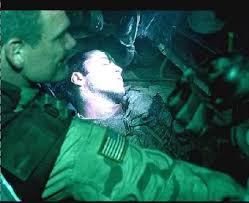
undefined

The one scene where the soldier is hurt but to make him better they must cause him more temporary pain by going into one of his wounds. It can be quite distressing watching it but it shows the pain and brought about by war, they really captured the torcher of the war and portrayed it well throughout, it’s all done through the script and art direction throughout, cause for me the colours really add to the sadness and there isn’t really a lot of moments when they try to break up the seriousness of it, because they simply can’t joke around that much.


To sum up it’s a great film, very well thought out in terms of Art direction, story line, environment and costumes. The main character is 18 years old which just tells you something about how scary that can be, going into a war at such a young age. 

Sunday, 12 February 2012

Queens Project - Week 5

Continuing with asset making this week. I’ve made a few small assets but one thing I think we’re still trying to come to terms with is our triangle budget. In the asset list we’ve all been assigned an equal amount of assets and a triangle budget prediction of how many each one with take. I find that some of my assets for example a clock and a first aid box take up way more than 60-70 triangles if you want them to have smooth edges. I know UDK can handle thousands of triangles but I’m trying to keep as low poly as possible. I found with a low triangle budget for the first aid box for example I can’t smooth off the edges as they are in my reference photos and also the handle for it is a 4 sided diamond/square shaped because of it being so limited, I couldn’t round off the edges and smooth them out. It’s becoming a slight problem the thing is to add more geometry and end up with something a bit more detailed and smoothed but at the expense of a few more triangles.


Honestly we’re in the process of just making assets this month, once done the texturing will commence, I’m struggling a little with understanding some of the assets at the moment, but if I manage the time they’ll hopefully should be done with enough time to texture them.

We’re at a point where e can populate the rooms and areas of the level with our assets to see what they look like as a prototype; it’s all a matter of time for now.

Year 2 - Week 15 - February 6th - 11th

Continuing with our masters project this week, in which I’ve decided that upon having to scan in our hands and being asked to colour pick from them I decided why not draw my hand as my masters study?

I was going for the style of Dali (my favourite master). Upon more research he used long bold brush strokes to make objects and such to have a soft and light surface. I particularly used this technique in my work and I’m very happy with the outcome. It didn’t take that long to make and it work very well I thought. I’ve always been interested in his work and now I’ve really gotten to soft of try out his technique/style. Also he’d use harder shorter brush strokes on things that would appear to have a harder surface.

 Attempt at emulating Dali.

I found that the traditional version was a more difficult just for the simple fact that it’s traditional! Meaning that the colour palette is limited where as using a tablet and Photoshop you’ve got an almost unlimited supply of colours thus making it easier to seek out the one you want I very much enjoyed this project, as much as I did last year. Last year I also painted the back of my hand as personal work, I thought it turned out well but this time it turned out better. I used a basically 2 brushes using oil on canvas. I think oil on canvas works so much better than trying to use water colours or acrylics, simply put I think it’s easier to layer over because the paints are so soft or in other words they don’t dry out easily an then making it harder to layer over or remove colours if you don’t want them. Like in Photoshop you have CTRL + Z to undo anything you don’t want where as traditional it’s a little harder.

Traditional version. Tried to make it look soft. *Note* this is a photo, a scanned version will follow soon once the paint dries.

Anyway in both practises I used big brush strokes and smaller ones where needed. In Photoshop I used the soft edged brush to create a gradient effect seen in most of Dali’s work. Dali would have hard edges around objects and usually soft shadows. Using darker tones of skin I was able to add shadows and highlights seen on my hand. It’s not an entirely accurate perfect mage of my hand but it’s the style that we’re going for. I found that even in my self portrait work that brown is basically the colour of the shadows created by light on the skin. Thus it is a mixture of red, peaches/pinks, yellow ochre, brown and blue and maybe a bit of orange pretty much what makes up flesh tones.


Dali's soft and hard approach.


In life drawing this week, some of us were experiment with paints however I feel that it’s a bit too much. Though I know that whenever you paint digitally of traditionally you should always put a base layer down which is what I’ve always done and build up layers of colours on top of each other, It’s no doubt that it’s the best way to do it. When I say that life drawing is a bit much, I mean that the pace we’re expected to work at is too much, 40 minutes on a painting isn’t long enough for me, I like to be accurate and ‘perfect’ about my work and I can only work at my own pace which is why most of my life drawing work looks very odd, inaccurate or unfinished, if given about 40 minutes for sketching I can get the body down how I want it and maybe find enough time for rendering but I like to take my time, I’m trying to become faster however with still life etc which may take me about 10-20 minutes...

1. Sketch, 2. Base Layer, 3. Adding shadows and highlights, 4. Adding tones, 5. Applying more colours, 6. Finished outcome.